Your AI limits,
always in sight.
Mimir sits in your macOS menu bar and shows Claude sessions, Codex credits, and Antigravity quotas in real time. No browser tabs, no context switching.
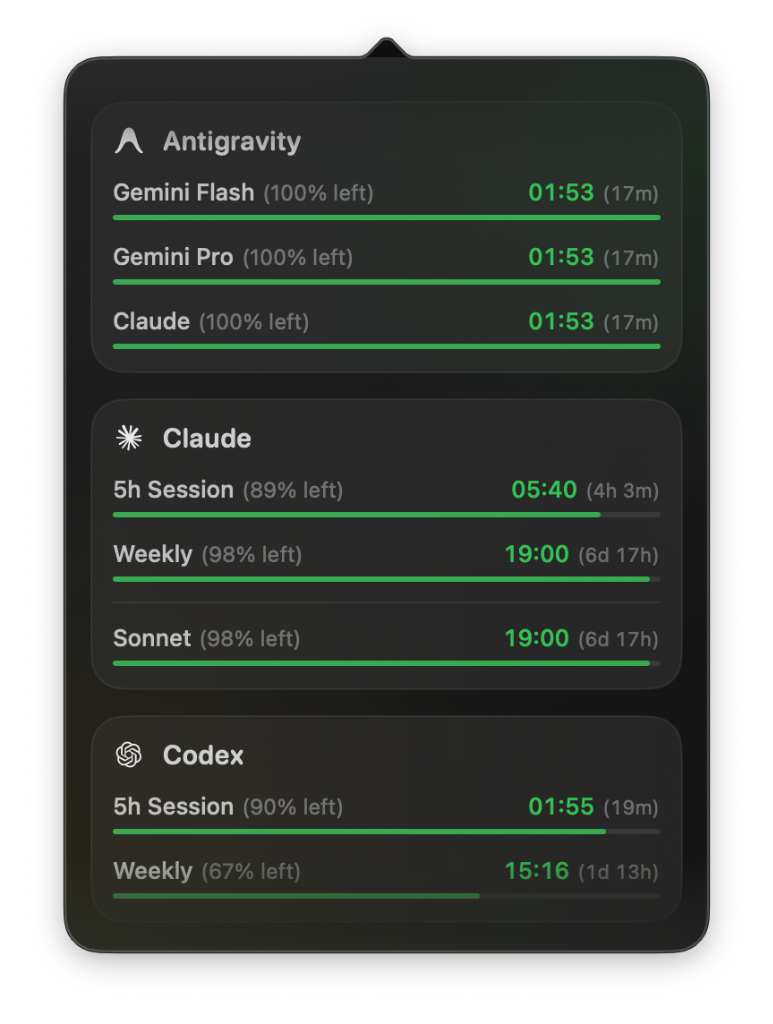
Three services.
Complete visibility.
Each tracked by reading local config files and macOS Keychain. Nothing is sent anywhere.
Tracks per-model quotas across Gemini Flash, Gemini Pro, and Claude — all through the Antigravity runtime.
Reads ~/.claude for session and weekly limits, including per-model Sonnet tracking.
Reads ~/.codex for session and weekly credit balances.
Local reads only.
No accounts.
Mimir watches the same config directories and Keychain entries that the AI tools themselves write to. It never makes network requests on your behalf.
-
Install and grant file access
One-time permission to read
~/.claude,~/.codex, and the Antigravity runtime directory. -
Mimir reads the local state files
Usage logs and session state are parsed directly. No API calls, no intermediary server.
-
Limits appear in the menu bar
Click the icon to see all services, current usage, and exactly when each quota resets.
Files Mimir reads
~/.claude/
Session + weekly usage
~/.codex/
Credit balance state
macOS Keychain
Antigravity runtime tokens
Data never leaves your machine. Mimir makes zero outbound network requests.
Up and running
in under a minute.
macOS 14.0 Sonoma or later. Swift 6.0 for building from source.
What's coming.
brew install --cask mimir

Ship without
hitting a wall.
Free, open source, and always one click away.
macOS 14.0 Sonoma or later · MIT License · Open source forever